How to add Multiple IP Address in Windows 2000,XP,2003

Sometimes, there is a need to have more than one IP Addresses assigned to a PC or a Server. If you have multiple services running on a server like a webserver and a mail server and want to assign each of these services seperate IP Addresses the Multiple IP addresses will help. While this need not necessarily require to have more than one Network Interface Card (NIC) on the server.

You can add multiple IP Addresses to a single interface card. However, these IP Addresses should be in the same logical network although in different subnets.

The following procedure will just guide you how to add Multiple IP Addresses:

1. Open Control Panel and Network Connections.

2. Right-click the LAN connection and select properties.

3. Select Internet Protocol (TCP/IP) and click properties.
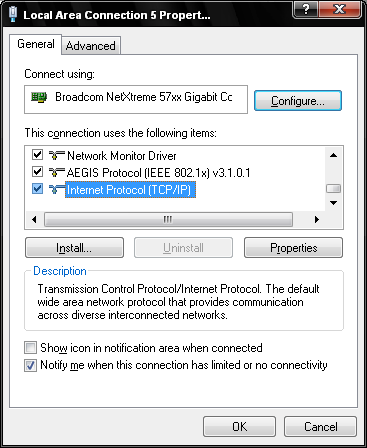
Windows Internet Protocol (TCP/IP)

4. Select "Use the following IP Address" and enter the primary IP Address, Subnet mask and Gateway and the primary and secondary DNS Servers.
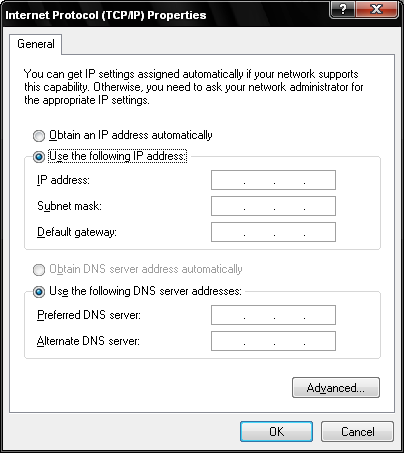
Enter Primary IP Address, Subnet gateway and DNS Servers

5. Click Advanced then Add under IP Addresses.

6. Add the IP Address and Subnet mask. Repeat the procedure if there are additional IP Addresses to be added.

Add Multiple IP Address

7. Click Add under "Default Gateways" and add the gateway addresses.
NOTE: The system will always use the 1st available Gateway and will use the additional gateways unless the primary gateway is not reacheable.
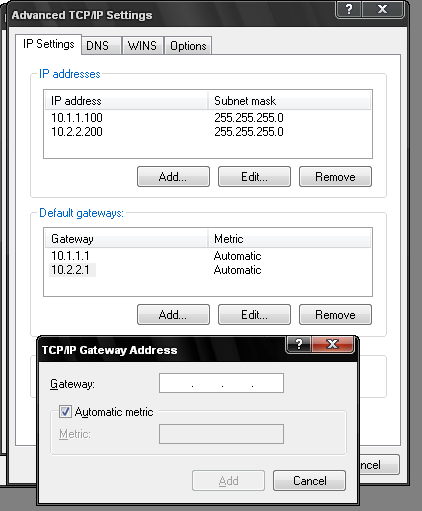
Add Multiple Gateways

8.Click OK then OK and then OK to save the changes.

9. To confirm the multiple IP Addresses are set, from the command prompt (Start-Run and type CMD) run the ipconfig command. You can see multiple IP addresses on one Network Interface Card.
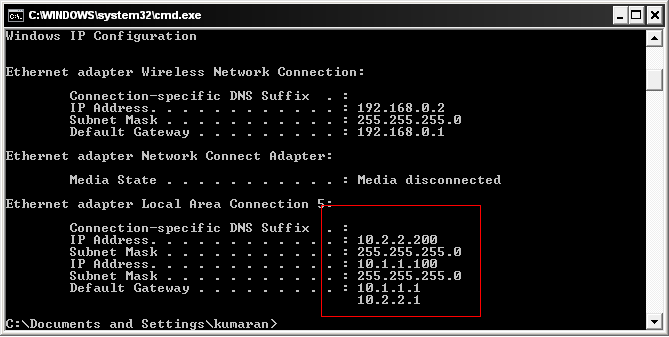
ipconfig output with multiple IP Address

Comments

59 responses to “How to add Multiple IP Address in Windows 2000,XP,2003”

  1. Antonio Avatar
    Antonio

    Excelent. I was looking for this.

  2. swap Avatar
    swap

    Dear sir,
    i configure multiple IP address in my windows XP system. But,i can’t access another system. (For Ex. my machine ip is 192.168.0.20 & i configure another ip in the same machine 192.168.1.20 MY some machine ip started from 192.168.0.1 to 192.168.0.30 & some machine ip started from 192.168.1.1 to 192.168.1.30 but i can’t access 192.168.0.1 machine from 192.168.1.1 machine. This all machine divided in two switch. Can i access both switch connected machine from one machine It is possible? please help me. Thanks!

  3. Barton Bruce Avatar
    Barton Bruce

    Thank you! I’ve been wondering how to do multiple IP addresses in windows. With gig-e NICs at home one is not likely to need the bandwidth or seperate physical ports.

    Now, how do I get specific programs to use only the IP address that is intended for them?

    Also, most any ethernet NIC one buys today proclaims it supports 802.1Q vlans, and my home cisco 2621 certainly does, but how do I get to configure them and use them in windows? I use them all the time on big routers and switches at work, it is just windows that is in or perhaps just is the fog cloud.

    VLANS would also be useful for virtual machines especially if that is the only way one can get specific programs to use specific addresses.

  4. admin Avatar
    admin

    802.1Q support is built into the NIC driver and most of them come with advanced configuration software. I’m Intel Pro cards & Broadcom cards do come wth the software with which you can add vlans IDs to it.

  5. Mike Avatar
    Mike

    Do you know what the upper limit is officially for the number of IPs you can assign to a single adaptor? I think I have experienced that up to 4 work, but I was wondering if anyone has seen any official documentation on this.

  6. Shoaib Avatar
    Shoaib

    I want to fix a logical IP address to a LAN card or MAC Address as if the user can never change IP settings. Please give me a solutions.

  7. admin Avatar
    admin

    Not sure about your setup. But, you can setup a reservation on ur DHCP to ensure that the PC/laptop gets the same IP address and restrict the switchport to a particular vlan (based on the DHCP scope)

  8. Kat Avatar
    Kat

    I did one to 7, but when I check in ipconfig, it lists all zeros. Would you happen to know why? And, what the fix is? Thanks.

  9. Cataldo Avatar
    Cataldo

    Great just what I needed thank you so much !

  10. Msreport92 Avatar

    Hi

    If you define two IP on one network card, you can have trouble to register dynamically the second IP on the DNS database.
    To do this, you need to create the MaxNumberOfAdressToRegister in the registry.
    For more information, see http://msreport.free.fr/?p=96 (in french).
    By.

  11. name Avatar

    Really nice=)but look this:,

  12. Rafiu Badmus Avatar
    Rafiu Badmus

    A private IP address is assigned to a serial interface of a router connected to a remote branch office via Frame relay.
    How is this working?is a private IP address routable?

  13. Rafiu Badmus Avatar
    Rafiu Badmus

    My LAPTOP IS HAVING a /32 prefix notation.how is this explicable?

  14. JJ Avatar
    JJ

    hey what am i suppose to enter into the DNS servers?

  15. abc Avatar

    how to find what is cyber cafe orignal ip address i see some cyber computer 192.16.x.x ip used but what is his real ip how to find out some one help me .

  16. admin Avatar
    admin

    192.168.x.x indicates their LAN private IPs. Their public IPs with which they are seen on the internet is shown on the top of this webpage.

  17. jk Avatar
    jk

    Hope this link is also useful:

    How can I configure my computer to use a DHCP obtained IP address along with a static IP address at the same time?
    http://www.petri.co.il/configure_tcp_ip_to_use_dhcp_and_a_static_ip_address_at_the_same_time.htm

  18. Rohit Avatar
    Rohit

    Excellent way to explain a good concept in a simple way.

  19. V.Manikandan Avatar
    V.Manikandan

    Dear Sir,
    I am serviece engg. i have findout one problem that problem cann’t understand it. That machine is RHEL machine gigabit ethernet card but cannot use 10mbps line but use for 100mbps line. that customer asking for i will use 10mbps line. Please sir any solution for this problem. but onboard Intel ethernet card. This ethernet card is support 10mbps line.

  20. kaydee Avatar

    Thanks alot! that’s what am really looking for!!! You make it so sweet to understand and follow…

  21. kunal roy Avatar
    kunal roy

    actually sir I just want to change or add my ip from command prompt

  22. Gaurav Avatar
    Gaurav

    Hi,
    Is there a way to set multiple IPs to a NIC using WMI APIs or netsh command? (I am able to do this using “netsh..add..”). Most importantly I wanted to know if there is a way to set an IP and identify it as Primary IP for the NIC.

    Say I have ip1, ip2, ip3 to be set to NIC1 of which ip2 should be my primary IP – how do I control this?

  23. vijaya Avatar
    vijaya

    My ip address is assigned dynamically by DHCP.I want to create two IP address to my machine.can any one help me pls.

  24. JDEdmo Avatar
    JDEdmo

    in this example is the 10.1.1.100 the external ip or is it a nother internal ip that you then need to change port setings and assign the accual external ip to?

  25. jcox Avatar
    jcox

    Thanks for the information. Any idea on how to script adding/deleting virtual ip’s?

  26. thamaraj Avatar
    thamaraj

    what is the benefit if i setup multiple IP in my PC?

    waiting for your reply friend : )

  27. Moid Khan Avatar
    Moid Khan

    I have 200 Pcs on lan and having 2 DSl Lines that is shared by all pc’s on lan and I have taken a third DSL line for the use of some particular PC’s on Lan and How to restricted the other PC’s of Lan to access this third lan and give access to the PC I wish to.

  28. Meicky Avatar

    Hi,

    This is something that I have wanted to use for a long time. I am trying to use VB based tool and want to use different Physical IP each time.

    If I add different Ip addresses as shown in above example, how can I keep suffling them to use different each time from the available list?

    Awaiting your response!

    Regards,
    Meicky

  29. Ignorant Avatar
    Ignorant

    Actually Sir, why are you describing this?

  30. aj Avatar
    aj

    Hi, my server is on DMZ side and I want to host two website on port 443 (SSL). It requires unique combination of IP address and port number. I created two IP address on same logical network although in different subnets. One website is working and the second is not. Do I need to do anything on my ASA firewall or CISCO switch?
    Many thanks,

  31. Passing by Avatar
    Passing by

    Hallo Meicky,

    Try this freeware :: http://ipchange.net/

  32. Sarasvats Avatar
    Sarasvats

    How to work with DNS server. it some times stops working either first or second

  33. luis maldonado Avatar

    I a single static ip address comming in and need to share it with 7 virtual machines. how can I access each of the internal vms from the outside with a single static ip address.

    Thanks for your help!

  34. trell Avatar
    trell

    i am hacking the hell out of the computer games that i play bkuz of this other ip adress…thanks!!!!!

  35. Mathew Avatar
    Mathew

    I have a network card which gets the ip from a DHCP.
    Is it possible to add another ip address to this card in addition to the DHCP ip address?

  36. Faysal Avatar

    Dear sir,
    I am really greatful to u for your help. My main IP is 192.168.120.160. There are more serial in my network like 192.168.111.x, 192.168.180.x and so on. But the problem is all the subnet masks are the same. SO when I combine several IPs cmd shows that but the problem is I lose the speed along with the main speed.In short me net becomes out of servie. It is not working in my pc. I think the problem is subnet mask that i have only one. What should I do…..Please tell me

  37. Naji Avatar
    Naji

    Dear all,

    This is great info. I am glad I ran to this. I could not find some of the answers to some of the questions like: How can I make my machine to shuffle or randomely use the configured IP addresses. I need this in a performance web test. Any pointers?

  38. Pepe Avatar
    Pepe

    Just one question regarding the sentence:

    “these IP Addresses should be in the same logical network although in different subnets.”
    Is there a problem to have more than one IP on the same NIC in the same subnet?

  39. Nimshan Avatar
    Nimshan

    Hi..

    Can we use different class ip addresses on the same NIC

    Those who knows please reply

    …..Nimshan

  40. referat Avatar

    hi there,
    how do i add a secondary ip if i already have a router connected to the server… the internet line is routed with a ADSL modem

  41. baugard Avatar
    baugard

    We have Windows servers with more than 20 IP addresses on a single NIC (and several NICs, all of which happen to be virtual). The IP addresses can be in different subnets and have different classes (/8,/16,/24). Works fine. The main reason we do that is that these servers act as interface boxes in multi-(V)LAN systems and need to be reachable from different subnets which are otherwise isolated.

  42. it-boyz Avatar
    it-boyz

    Thanks alot for your info.. bro…

  43. Maaz Najam Avatar
    Maaz Najam

    Hi

    We are facing a slightly different problem than what you people are discussing here.

    In our organization, there are over 700 users connected through LAN and/or Wifi through DHCP.when a particular user moves from LAN to Wifi or vise versa, He/She starts using two IP addresses. Even after disconnecting from either connections, the IP address doesnt gets released and so any other who has just connected wont get an IP.
    (We are using 4 pools of IPs, which I am sure is more than enough for 700 users.)
    Basically what we want is , as soon as a user moves from LAN to Wifi or Viseversa the old IP assigned to his system should be released for any other user.

    Thanks in advance !

  44. alireza Avatar
    alireza

    that was great thanks

  45. Paulo Lobo Avatar
    Paulo Lobo

    Great. This is what I was looking for.
    Thanks!

  46. DEVAT NIRAJ A Avatar

    RESPECTED SIR,
    I dont know how to creat IP address in networking.so please send me step by step detail in gmail emil id.I am waiting for your reply.

  47. DEVAT NIRAJ A Avatar

    RESPECTED SIR,
    I dont know how to creat IP address in networking.so please send me step by step detail in gmail emil id.I am waiting for your reply.I am waiting for your reply.

  48. sudhanshu Avatar

    I am not able to run the Internet after configuring the new Ip

  49. Perushan Naicker Avatar
    Perushan Naicker

    Hi

    I also would like to know how to setup multiple IP Adresses in Windows 7 or XP.

    Here is my situation ;

    We have 3 different branches which is connected to our head office.

    Each branch has a different IP Range

    Head office IP Range is 192.168.30.0
    Branch A is 192.168.33.0
    Branch B is 192.168.0.0
    Branch C is 10.0.0.0

    The reason for multiple IP adresses is because when the CEO goes to his desk at all the different branches he plugs his lan cable to the laptop and doesn’t want to change the ip adress all the time. He wants that specific IP Adress which is assigned to him per branch on the laptop so that he is of the proxy and has full internet access.

    Your help in this regard will be highly appreciated

    You

Leave a Reply

Your email address will not be published. Required fields are marked *