How to add Multiple IP Address in Windows 2000,XP,2003

Sometimes, there is a need to have more than one IP Addresses assigned to a PC or a Server. If you have multiple services running on a server like a webserver and a mail server and want to assign each of these services seperate IP Addresses the Multiple IP addresses will help. While this need not necessarily require to have more than one Network Interface Card (NIC) on the server.

You can add multiple IP Addresses to a single interface card. However, these IP Addresses should be in the same logical network although in different subnets.

The following procedure will just guide you how to add Multiple IP Addresses:

1. Open Control Panel and Network Connections.

2. Right-click the LAN connection and select properties.

3. Select Internet Protocol (TCP/IP) and click properties.
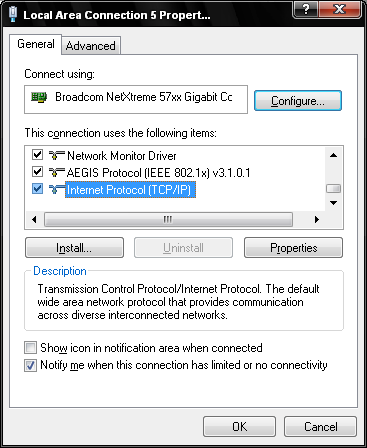
Windows Internet Protocol (TCP/IP)

4. Select "Use the following IP Address" and enter the primary IP Address, Subnet mask and Gateway and the primary and secondary DNS Servers.
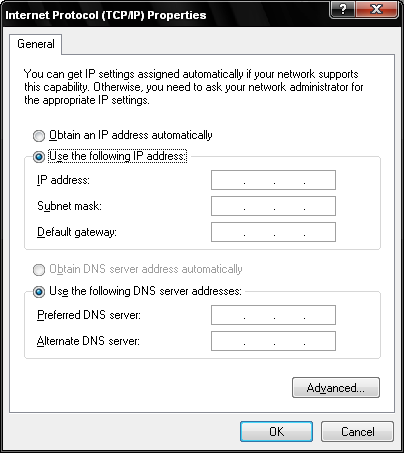
Enter Primary IP Address, Subnet gateway and DNS Servers

5. Click Advanced then Add under IP Addresses.

6. Add the IP Address and Subnet mask. Repeat the procedure if there are additional IP Addresses to be added.

Add Multiple IP Address

7. Click Add under "Default Gateways" and add the gateway addresses.
NOTE: The system will always use the 1st available Gateway and will use the additional gateways unless the primary gateway is not reacheable.
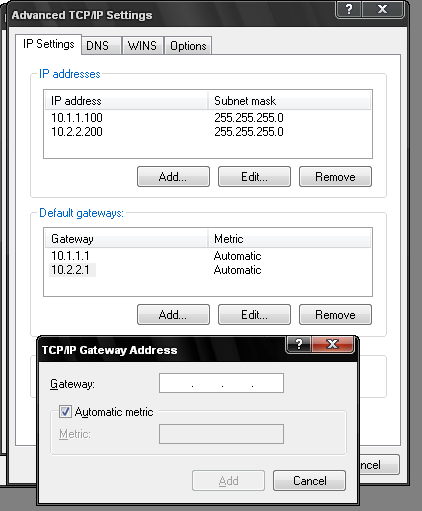
Add Multiple Gateways

8.Click OK then OK and then OK to save the changes.

9. To confirm the multiple IP Addresses are set, from the command prompt (Start-Run and type CMD) run the ipconfig command. You can see multiple IP addresses on one Network Interface Card.
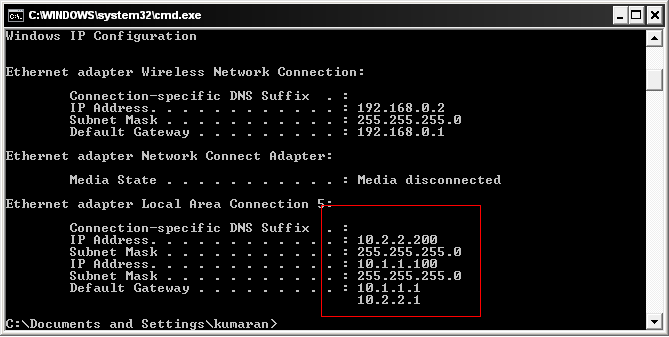
ipconfig output with multiple IP Address

Comments

59 responses to “How to add Multiple IP Address in Windows 2000,XP,2003”

  1. Divesh Avatar
    Divesh

    Good Explanation, Useful aricle

  2. naga Avatar
    naga

    thanks for info

  3. Bespoke Software Development Avatar

    Nice, I’ve got 4 set up and seems to be working great. Thanks!

  4. namaraj wagle Avatar
    namaraj wagle

    After doing all above only one ip through a getway accessed. How to add route of next getway.????

  5. […] 2,464 O_o It depends on the facilities of your router and "OS", but you may be able to ask your router to do this for you. Using a router would be the preferred approach. That said, this is possible within almost every "OS" including "Windows XP". Soma How to add Multiple IP Address in Windows 2000,XP,2003 | ItsyourIP.com […]

  6. Iyalarasi Avatar
    Iyalarasi

    sir,

    I want to assign multiple ip address for my system. So when i excute my .net webapplication it generates different ip address. and I also configure a list of ip address in my webconfig file which only allowed to excute my application.

    can u give me any idea or suggestion?

    Thanks in advance

  7. […] Option 1: Run VisualSVN Server and IIS on different IP address You can run VisualSVN Server and IIS side-by-side on the same port using multiple IP address on network interfaces: http://www.itsyourip.com/networking/how-to-add-multiple-ip-address-in-windows-2000xp2003/ […]

  8. […] This would be a total hack, but you could try assigning the IP of the server in question as an additional IP on you local interface, instructions here […]

Leave a Reply

Your email address will not be published. Required fields are marked *