HowTo: Add persistent Static Routes in Windows

As with the Unix,Linux and Solaris operating Systems, the route command can be used to add static routes in Windows. This should work on Windows 2000,XP,2003.
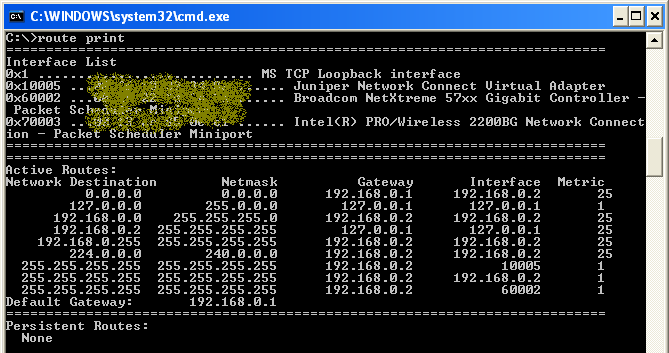
Windows Route Print command 

To view the existing routes,

C:\> route print

To add a static route,

Syntax:

C:\> route add <target> mask <netmask> <gateway IP> metric <metric cost> if <interface>

Example:

C:\> route add 10.10.10.0 mask 255.255.255.0 192.168.1.1 metric 1

Note: If there is more than one Network Interface and if the interface is not mentioned, the interface is selected based on the gateway IP.

This Static route gets erased when the system reboots. To avoid this, use the -p (Persistent) switch to the above command:

C:\> route -p add 10.10.10.0 mask 255.255.255.0 192.168.1.1 metric 1

This writes the persistent route to the following Windows Registry key as a string value (REG_SZ):

HKEY_LOCAL_MACHINE\SYSTEM\CurrentControlSet\Services\Tcpip\Parameters\PersistentRoutes

Also, you can write a small batch file with the route commands and add it to the startup folder to add the routes at startup (similar to the startup scripts in Solaris)

For more options like flushing the IP Routing table or to delete, modify IP Routing table entry use the route command with no arguements. This displays the various options for the route command.

C:\> route

This should help.

Comments

10 responses to “HowTo: Add persistent Static Routes in Windows”

  1. Hady Marzuki Avatar

    Just the info that I need. Thx.

  2. Chris Avatar
    Chris

    Very helpfull. Thanks

  3. Kullit Avatar
    Kullit

    please email me if i want to add static password for singale ip, my compuetr ip is 192.168.4.1 and want to route this 192.168.0.1. how can i do that?

  4. Rick Avatar
    Rick

    Great Infomation, Thank you.

  5. Nagilum Avatar

    Thanks for that hint!
    Could have found that myself… but I didn’t read the full info/output. 😉

  6. newbie2010 Avatar

    I have one remote branch with an IP address of 192.168.4.2 netmask 255.255.255.0.GW is 192.168.4.1 What is the best syntax or routing command for me to ping interanal client pc such as 192.168.16.5 from our head office? My Head office had a MODEM 192.168.0.1 LAN ip, and its directly connected to a router with 192.168.16.3 LAN IP. Using 192.168.16.5 pc, I cant ping remote modem 192.168.4.1 modem but no luck to 192.168.4.2 pc.Any helpfull advice?

  7. […] server routing table that points those specific ip addresses out via the secondary provider router HowTo: Add persistent Static Routes in Windows | ItsyourIP.com route -p add 10.10.10.0 mask 255.255.255.0 192.168.1.1 metric 1 in your scenario you would […]

  8. Jack Burch Avatar
    Jack Burch

    Fantastic. The information got my job done.

  9. AD Avatar
    AD

    Thanks for the help… I had added a route without taking the print earlier and was then unable to connect to the network. I checked the files in winnt\system32\drivers\etc files but did not find anything.
    But I know where I should search (registry entries of course)!!!

Leave a Reply

Your email address will not be published. Required fields are marked *