Haute Secure is a free Internet Explorer plugin that secures you from loading bad content or malicious content or download and install malware onto your PC. When the Haute Secure add-on on your internet explorer comes across bad content it will block access to the website and prompt you for further option. It will also warn of malicious content try to load from known website. With Phishing scams, malicious malware spreading minute and the identity theft scams, it is important that we secure the browsers thereby no malicious content is downloaded onto the PC. Haute Secure supports only Internet Explorer at the moment but Firefox is expected to be onboard soon. There is also a Windows Vista 64 bit supported version available download.
Download Haute Secure from here
Windows Vista 64 bit version is here
Installation is fairly straight forward, just follow the onscreen wizard to complete the installation and reboot the system for the changes to take effect. After the reboot when you open the browser the first time, it adds an icon for the Haute Secure protection. You can create a login and register the system with Haute Secure. The alerts look as follows

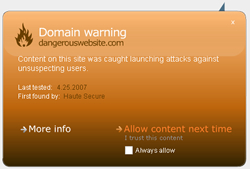
There are more sample RED & ORANGE warnings here. You can also test how Haute Secure works here.